


How to Build a Chiropractic Webinar Funnel That Converts Patients in 2026

by Gerek Allen ~ Last Updated: December 9, 2025 ~ 11 Min Read
by Gerek Allen
~ Last Updated: December 9, 2025 ~
~ 11 Min Read ~
Here's the short answer: building a chiropractic webinar funnel takes seven pieces working together—a compelling topic, the right platform, a registration page that actually converts, automated emails, a presentation that delivers real value, smart promotion, and follow-up that turns viewers into patients.
When you nail it? Webinar funnels convert 20-40% of attendees into qualified leads. That's not a typo.
Now... let me explain why this matters for your practice.
Most chiropractors I talk to are stuck in the same cycle. Facebook ads keep getting pricier. SEO takes forever. Referrals are great but unpredictable. And you're competing with every other doc in town for the same patients.
Webinars change the game completely.
Instead of chasing people down, you attract them by solving problems they're already googling. You teach first. Build trust. And by the time you make an offer, you're not some random chiropractor—you're the expert who just helped them understand their back pain.
The data backs this up. Webinar landing pages convert at 59%—nearly six times higher than typical landing pages. The average registration-to-attendee rate hits 56%. And 73% of webinar attendees become leads.
Pretty damn good numbers, right?
Here's what we're gonna cover: everything from picking a topic that resonates to converting attendees into long-term patients. No theory. Just stuff you can implement this week.
Let's get into it.
Why Webinar Funnels Work for Chiropractic Practices

Here's the thing about webinars—they solve the biggest problem you've got: building trust before someone ever walks through your door.
Think about it. Most potential patients have questions. Concerns. Maybe some misconceptions about what chiropractors actually do.
A webinar lets you tackle all of that in one shot.
The Trust Factor
Put yourself in their shoes for a sec.
They've got nagging back pain. Tried stretching. Popped some ibuprofen. Now they're considering seeing a chiropractor but honestly? They're not sure what to expect. Is it gonna hurt? How many visits are we talking? Is this even legit?
A 30-minute webinar on "Understanding Your Back Pain: When to See a Chiropractor" handles all of that at once:
- You become an educator, not a salesperson (huge difference in how people perceive you) - They see you helping before you ask for anything, which builds credibility faster than any ad ever could.
- Objections get handled before they're even raised (Is it safe? Will it hurt? How long will this take?) - You address the mental barriers keeping them from booking.
- Real human connection happens (they see your face, hear your voice, get your vibe) - That's something a blog post or social ad just can't replicate.
- Only serious people show up (tire-kickers don't register for webinars) - You're automatically filtering for folks who actually want what you offer.
This isn't like running ads where you're interrupting someone's Instagram scroll. You're giving people exactly what they came looking for.
Sound fair?
The Economics Actually Make Sense
Alright, quick reality check on the numbers.
The average cost per webinar lead is $72. Compare that to Facebook where costs keep climbing. Or Google Ads where chiropractic keywords run $15-30+ per click (and that's before anyone books).
But here's where it gets really interesting for chiropractic lead generation.
Webinar leads are warm. Like, really warm. These people:
- Gave you their email on purpose
- Sat through 30-45 minutes learning from you
- Self-identified as having the exact problem you solve
- Already know and trust you before the first appointment
The webinar software market is projected to grow from $9.91 billion in 2025 to $29.39 billion by 2034. Every industry is leaning into this because it flat-out works.
| Average Cost Per Lead | $72 | $50-150+ | $75-200+ |
| Lead Quality | High (pre-qualified) | Hit or miss | Moderate |
| Trust Built | Strong | Basically none | Basically none |
| Time to First Appointment | Often immediate | Multiple touches needed | Multiple touches needed |
| Reusable Content | Yep (recordings work forever) | Nope | Nope |
Choosing Your Webinar Topic
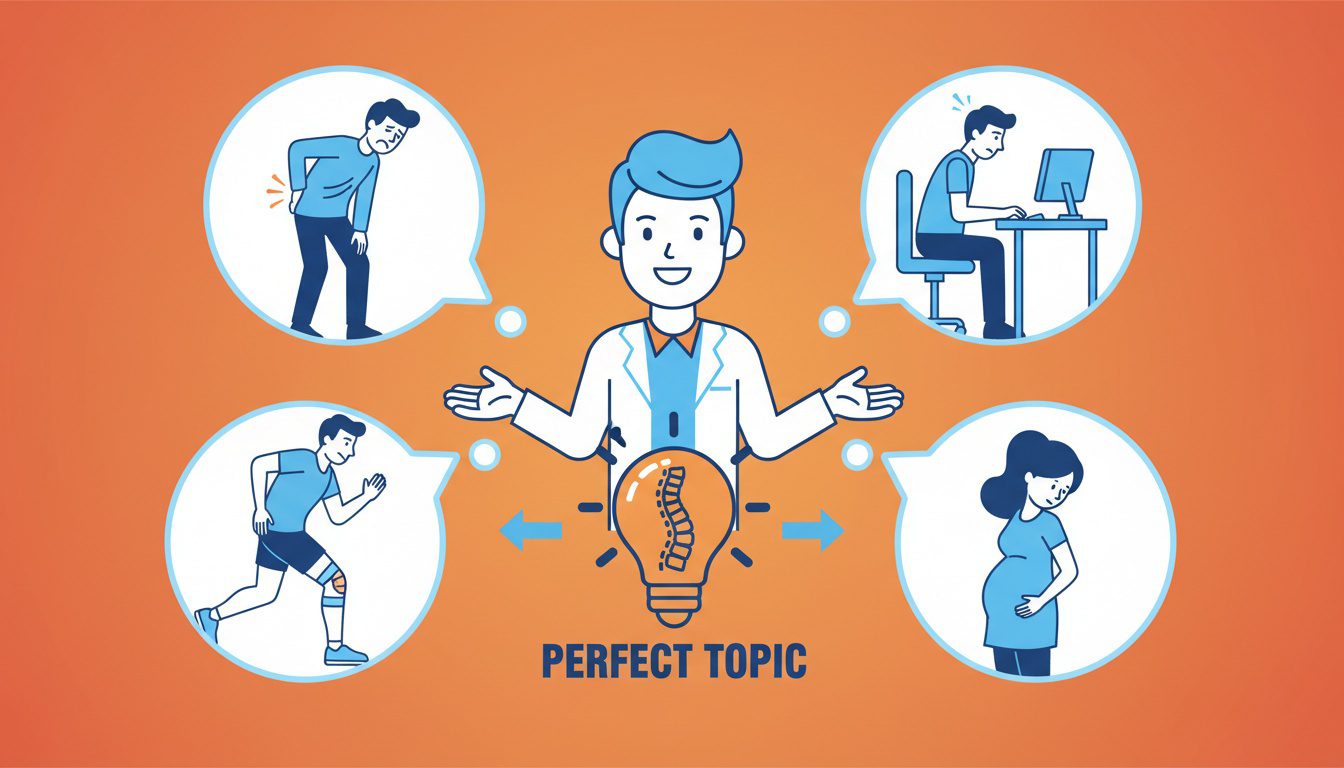
Your topic can make or break the whole thing. Seriously.
Go too broad and nobody feels like it's for them. Go too narrow and you limit your audience to like twelve people.
The sweet spot? Topics that solve specific problems your ideal patients already know they have.
What Makes a Topic Actually Convert
The best webinar topics share three things:
- Problem-aware audience (they already know something's wrong) - You're not convincing people they have a problem. You're showing them the solution. Way less friction.
- Clear outcome promise (they'll walk away with something useful) - "Understanding Chiropractic Care" is vague and boring. "3 Exercises That Actually Help Sciatica" is specific and actionable.
- Natural bridge to your services (the solution involves what you do) - The topic should organically lead to "...and this is where professional help comes in."
Here's what NOT to do: Don't make your webinar a 45-minute sales pitch disguised as education.
People can smell that from a mile away. And they'll bounce.
Topics That Actually Work
These frameworks consistently perform well:
- Pain-Specific Topics (back pain, neck pain, sciatica, headaches) - People actively search for relief. "3 Reasons Your Back Pain Keeps Coming Back (And What Actually Fixes It)" speaks directly to frustrated patients.
- Lifestyle Topics (desk ergonomics, sleep positions, posture) - These attract folks who don't know they need you yet but are experiencing symptoms.
- Condition-Specific Topics (pregnancy discomfort, sports injuries, auto accident recovery) - Target specific demographics and position yourself as the go-to specialist.
Myth-Busting Topics (when to see a chiropractor vs. other providers, what your first visit looks like) - Tackles objections head-on and reduces fear of the unknown.
| Pain-Specific | "End Your Sciatica: A Chiropractor's Guide to Real Relief" | Active pain sufferers | Very High |
| Lifestyle | "Desk Workers: How to Fix Your Posture Before It's Too Late" | Prevention-minded pros | High |
| Condition-Specific | "Pregnancy Pain Relief Without Medication" | Expecting mothers | High |
| Myth-Busting | "5 Things Your Doctor Won't Tell You About Back Pain" | Skeptical but curious | Moderate-High |
Want more content ideas? Check out our guide on chiropractic content marketing.
NEED MORE CLIENTS?
Free conversion-focused analysis uncovers the 3 biggest problems killing your bookings — we'll walk you through your results personally
Selecting the Right Webinar Platform
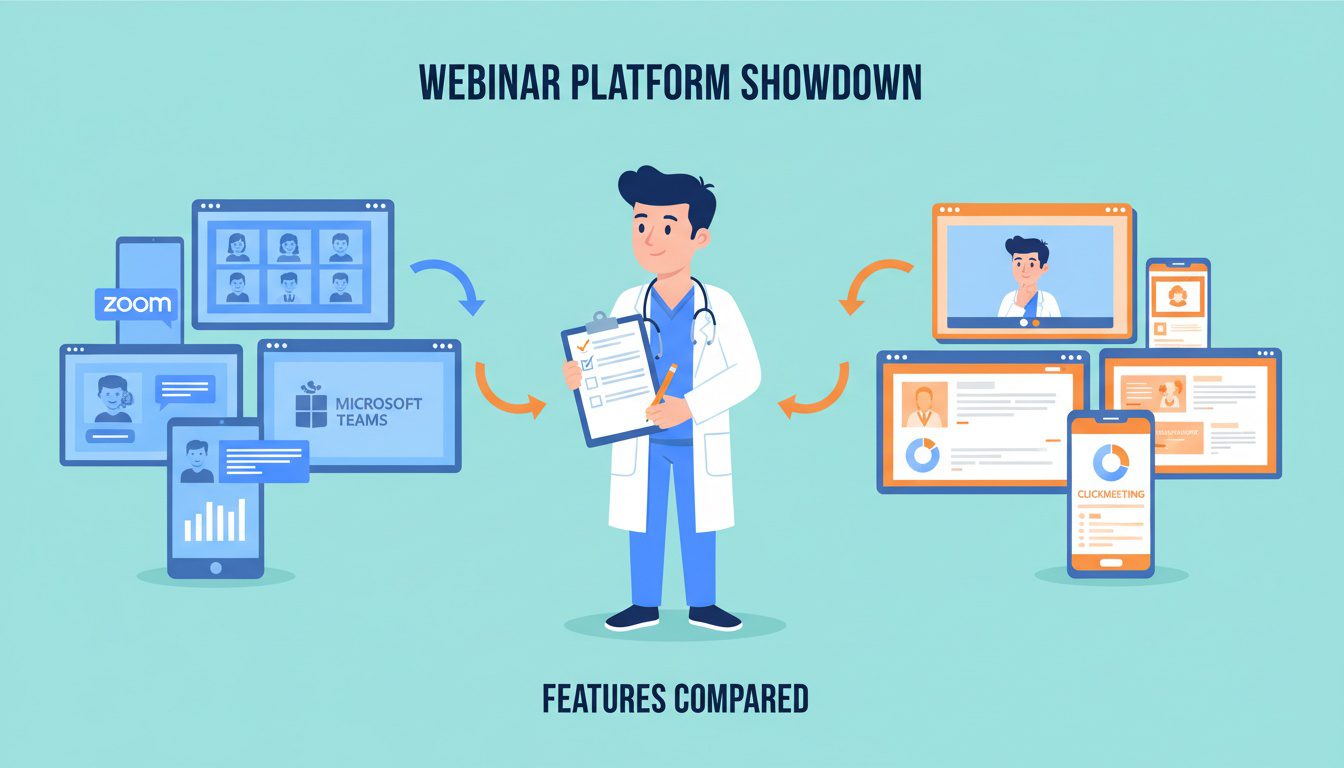
Let's keep it real here—you don't need the fanciest, most expensive platform to get results.
What you DO need is something that won't make you want to throw your laptop out the window when you're setting it up.
What Actually Matters
For chiropractic practices, focus on these features:
- Easy registration pages (built-in landing page builders are clutch) - You want professional-looking pages without hiring a developer or buying separate software.
- Email automation (automatic reminders and follow-ups) - This does the heavy lifting so you're not manually emailing people at midnight.
- Recording capabilities (turn one webinar into evergreen content) - Your single live event becomes a lead magnet that works 24/7.
- Interactive tools (Q&A, polls, chat) - 81% of webinars use Q&A sessions, and these features seriously boost engagement.
- Reliable streaming (nothing kills credibility like freezing mid-sentence) - Test any platform before you go live for real.
CRM integrations (connect with what you're already using) - Keeps leads from slipping through the cracks.
Platform Breakdown
| Zoom Webinars | $79/mo | Familiar, reliable | Everyone knows Zoom already, solid features | Feels kinda corporate, limited customization |
| Demio | $42/mo | Marketing-focused practices | Beautiful design, great analytics, super easy | Lower attendee limits on base plan |
| EasyWebinar | $99/mo | Automation nerds | Killer for evergreen/hybrid webinars, strong marketing tools | Pricier starting point |
| WebinarNinja | $79/mo | All-in-one simplicity | Live, automated, hybrid options, decent landing pages | Fewer fancy integrations |
| Livestorm | Free tier available | Budget-conscious | No downloads needed, solid free plan | Limited features unless you pay |
If you're just getting started? Zoom Webinars or Demio give you the best bang for your buck. Planning to run evergreen automated webinars down the road? EasyWebinar's automation is worth the extra cost.
Whatever you pick should play nice with your overall chiropractic marketing automation setup.
Building Your High-Converting Registration Page
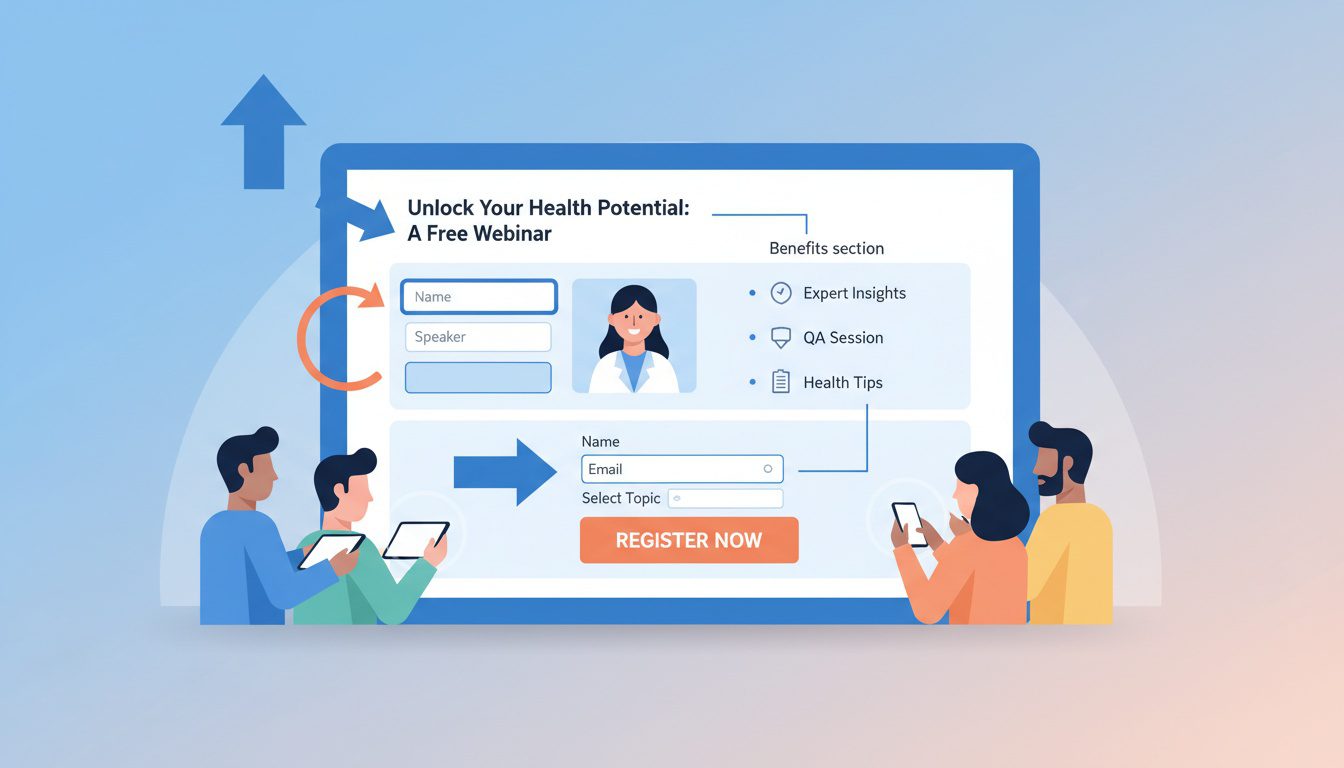
Your registration page is where curious visitors become actual registrants. This is where the magic happens.
And the numbers don't lie—webinar landing pages convert at 59% when done right. That's nearly six times better than typical landing pages.
Every single element on this page has one job: get the registration.
The Must-Have Elements
Here's what needs to be on your page:
- Benefit-driven headline (what they'll learn or achieve, not just your topic title) - "Learn How to..." or "Discover the 3 Secrets to..." crushes generic titles by 40-60%.
- Date, time, and duration front and center (no guessing games) - People need to know immediately if they can make it.
- Your credibility (photo, credentials, quick bio) - Folks register for webinars from experts, not faceless practices.
- Bullet-point benefits (3-5 specific things they'll walk away with) - Specific beats vague every time. "You'll learn exactly when to use ice vs. heat" beats "Understanding pain management techniques."
- Super simple registration form (name and email, maybe one qualifying question) - Every extra field you add kills conversions. Keep it minimal.
- Obvious CTA button (action words like "Save My Seat" or "Register Free") - Make it pop. Contrasting colors. Impossible to miss.
- Zero distractions (ditch the navigation, footer links, anything that leads elsewhere) - This page has ONE job. Don't give people escape routes.
For more on pages that convert, check out our guide on chiropractic landing pages.
Copy That Converts
The words matter just as much as the design. Here's what works:
- Talk directly to them - "You'll discover..." hits harder than "Attendees will learn..."
- Handle objections upfront - Worried people think it's a sales pitch? Say "No sales pitch—just practical info you can use immediately."
- Create urgency (the right way) - Limited spots, specific date/time, early registration bonuses. Motivating, not manipulative.
- Social proof if you've got it - "Join 200+ locals who've attended our workshops" or testimonials from past attendees.
Here's a headline formula that consistently works:
"[Target Audience]: Learn [Specific Outcome] in [Timeframe] (Without [Common Obstacle])"
Example: "Desk Workers: Learn How to Fix Your Posture in 30 Days (Without Expensive Equipment or Daily Gym Visits)"
| Headline | "End Your Back Pain: A Chiropractor's Step-by-Step Relief System" | Specific outcome, implies a proven method |
| Subheadline | "Free 45-minute workshop reveals what most doctors won't tell you" | Intrigue + emphasizes free value |
| CTA Button | "Save My Free Seat" | Action-oriented, reinforces no cost |
| Form Fields | Name, Email, "What's your biggest pain challenge?" | Minimal + one qualifying question |
Creating Your Webinar Email Sequence
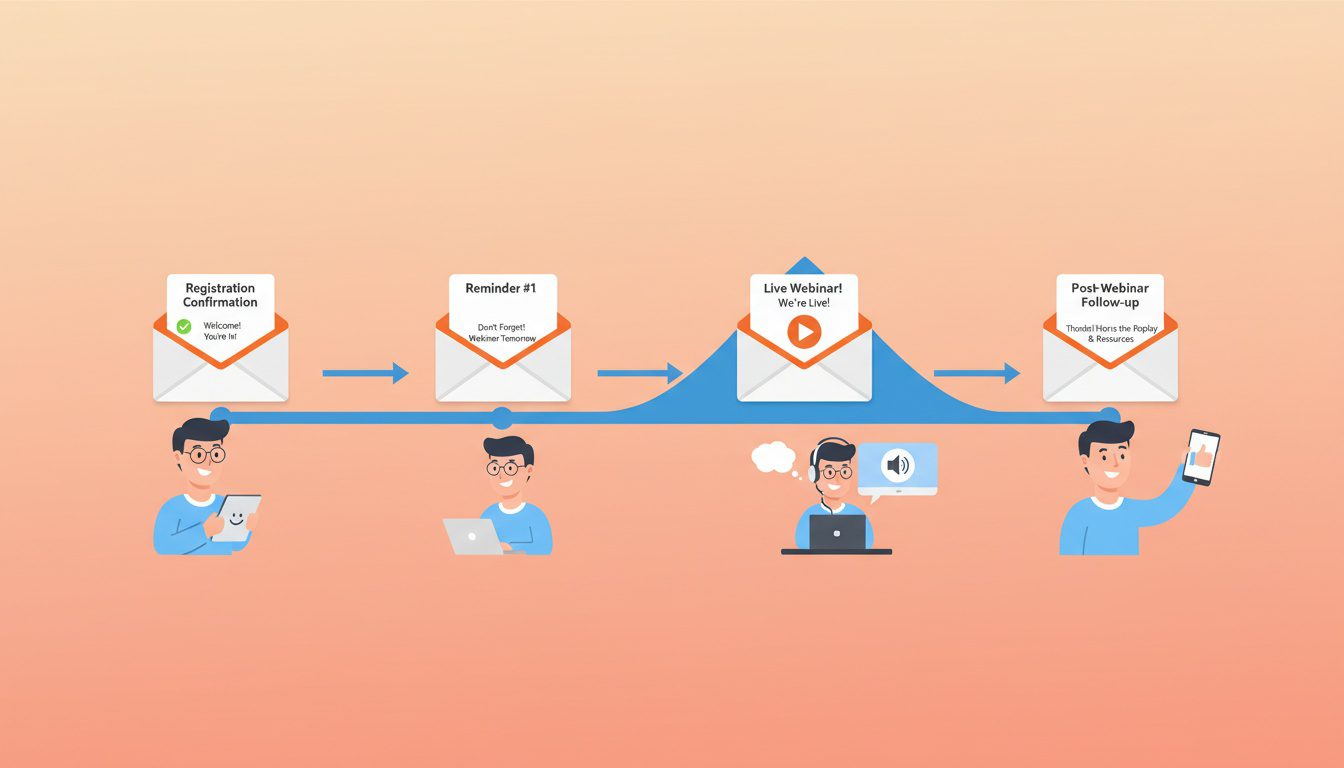
Here's where most chiropractors completely drop the ball.
They get registrations. They do the webinar. And then... crickets. No follow-up. No conversion.
Your email sequence handles the heavy lifting between registration and patient booking. Without it? You'll lose most of your registrants before they even attend.
Average attendance rates sit around 40-50%. A solid email sequence pushes that number up AND converts more attendees into actual patients.
Pre-Webinar Emails (Get Them to Show Up)
These emails are all about driving attendance:
- Instant confirmation (seconds after they register) - Include date, time, webinar link, calendar invite. Thank them. Remind them what they'll learn. Super simple.
- 7-day reminder (if they registered early) - Restate the value. Add a calendar link. Maybe share a relevant piece of content to build excitement.
- 1-day reminder (the day before) - Create some anticipation. Mention what you'll cover. Include the link. Keep it short.
- 1-hour reminder (just before showtime) - Simple and direct: "We start in 60 minutes—here's your link." Any tech instructions go here.
- 15-minute reminder (final nudge) - "We're starting soon! Click here to join." That's it. Nothing else needed.
Here's a kicker: Promoting 4 weeks in advance gets you 12% more registrations. Give yourself enough runway.
Post-Webinar Emails (Convert Them to Patients)
This is where the money gets made:
- Thank you email (within 1 hour of ending) - Thank attendees. Recording link. Quick recap of key points. Your offer with a clear deadline.
- Didn't attend email (same timeframe, different list) - Show them what they missed. Provide the recording. Same offer as attendees.
- Value-add email (1-2 days later) - Share extra resources tied to the topic. Blog post, checklist, video. Soft offer reminder.
- Offer reminder (2-3 days later) - Deadline's approaching. Remind them what's on the table and what they'll miss.
- Final call (deadline day) - Last chance. Clear deadline. Clear action. Clear consequence of not acting.
If you've already got email marketing going, plug this into your existing chiropractic email automation system.
| Confirmation | Immediately | Confirm details | Add to calendar |
| Reminder 1 | 7 days before | Build anticipation | View agenda |
| Reminder 2 | 1 day before | Make sure they remember | Save the date |
| Reminder 3 | 1 hour before | Final prep | Join webinar |
| Reminder 4 | 15 min before | Get butts in seats | Join now |
| Thank You | 1 hour after | Deliver value, make offer | Book appointment |
| No-Show | 1 hour after | Re-engage | Watch recording |
| Follow-up | 1-2 days after | Add more value | Take next step |
| Deadline | Offer expiration | Create urgency | Claim offer now |
Structuring Your Webinar Presentation
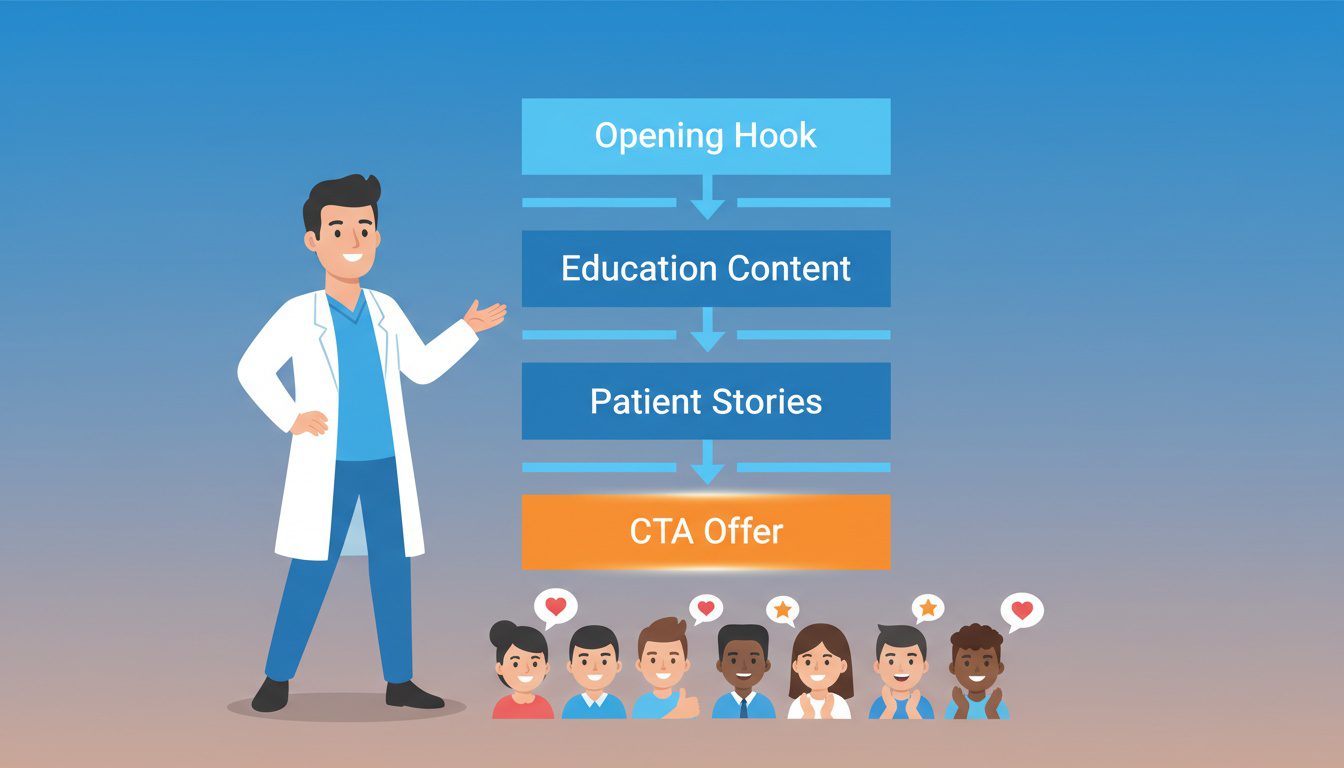
The structure of your webinar determines whether people stick around or bounce.
Ideal length is 30-45 minutes, with 44% of attendees preferring the 45-minute mark.
That's your window. Don't waste it.
The Framework That Works
Here's a structure that keeps attention and converts:
Opening (5 minutes)
- Hook 'em immediately - Bold statement. Surprising stat. Question that makes them lean in. Don't start with "Hi, I'm Dr. Smith and today we're going to talk about..."
- Quick credibility - Who you are and why you know this stuff. Keep it under 60 seconds. Nobody wants your life story.
- Set expectations - Tell them exactly what they'll learn and what they'll be able to do after.
Educational Content (25-30 minutes)
- Break it into chunks - 3-5 distinct sections with clear transitions. Makes it digestible.
- Stories and examples - Real patient stories (anonymized obviously) make concepts stick. People remember stories, not bullet points.
- Get interactive - Questions. Polls. Encourage chat. Top webinars hit 64% engagement rates when they use interactive elements.
- Deliver actual value - Here's the counterintuitive part: if they could solve their problem with just this webinar, you've done it right. That makes them MORE likely to become patients, not less.
Transition and Offer (5-10 minutes)
- Natural bridge - "Now that you understand [topic], let me show you how we help people take this further..."
- Clear offer - What you're offering. Why it's valuable. Time-limited bonuses if you've got 'em.
- Handle objections - Address the common concerns (time, money, "I'll think about it") directly in your pitch.
Q&A (10-15 minutes)
- Have backup questions ready - Prepare 3-4 in case the audience is slow to engage at first.
- Keep answers tight - Rambling kills momentum. Be direct.
Connect answers to your offer when it makes sense - "Great question—that's exactly what we dig into during the initial assessment."
Quick Slide Tips
Your slides support YOU. They're not the main event.
- One idea per slide - Cluttered slides split attention and confuse people.
- Visuals over text - Images and diagrams communicate faster than bullet points.
- Consistent branding - Your practice colors and logo throughout. Looks professional.
- Big readable fonts - Tons of people watch on phones. If it's hard to read, they'll tune out.
Reveal info gradually - Don't show everything at once. Build points to keep attention.
Promoting Your Webinar

Here's the thing—doesn't matter how good your webinar is if nobody registers.
And here's what the data says: email generates 57% of total webinar registrations. That's your bread and butter right there.
But you'll want a multi-channel approach for maximum reach.
Channels That Actually Work
Prioritize based on what you've already got:
- Your email list (highest conversion by far) - These folks already know you. Trust you. Segment by interest if possible and send a dedicated invite sequence.
- Your website (catch organic traffic) - Banner. Popup. Dedicated page. Exit-intent popups work surprisingly well here.
- Social media (reach beyond your list) - Post multiple times. Countdowns. Behind-the-scenes content. Reminder posts.
- Google Business Profile (local eyeballs) - Create a post about your webinar. Reaches people actively searching for local chiropractors.
- Local Facebook groups (community reach) - If group rules allow, share your free educational webinar. Frame it as a community resource, not a pitch.
- Partner cross-promotion (borrow other audiences) - Yoga studios, gyms, massage therapists, PTs... they serve the same people you do. Offer to promote their stuff in exchange.
More on digital promotion in our complete guide on chiropractic digital marketing.
Your Promotion Timeline
Timing matters big time:
- 4 weeks before - Announce. Open registration. First email to your list.
- 3 weeks before - Social campaign starts. Reminder email to list.
- 2 weeks before - Second wave of social posts. Reach out to potential partners.
- 1 week before - Email sequence ramps up. Final push on social.
Day of - Morning reminder email. "Happening today!" social posts.
| Email List | 4-2 weeks before | 10-25% of list registers |
| Website | Ongoing | 2-5% of visitors |
| Social Media | 3-1 weeks before | 1-3% of followers |
| Google Business Profile | 2 weeks before | Varies |
| Partner Promo | 2-3 weeks before | Depends on their audience |
Converting Attendees to Patients

Alright, the webinar's done. Now what?
This is where most chiropractors totally fumble. Great content. Positive feedback. Aaaand... nothing happens. No follow-up. No bookings. Crickets.
Don't be that person.
89% of webinar attendees visit the host's website afterward. They're ready to move. You just gotta give them a clear path.
Making an Offer They Can't Refuse
Your offer should feel like the obvious next step, not a hard sell:
- New patient special (discounted consult, free assessment, waived exam fee) - Make that first appointment a no-brainer.
- Time limit (48-72 hours) - Creates urgency without being sleazy. People who would eventually book often just need a deadline to act NOW.
- Remove the risk (satisfaction guarantee, no obligation) - Addresses the commitment fear that stops people from booking.
- Stack on bonuses (free resources, personalized recs) - Increases perceived value without costing you anything.
Here's the key: make the offer genuinely valuable, not just cheap. People don't want discount chiropractors. They want confidence they're making the right call.
Your Follow-Up System
Systematic follow-up = more conversions. Simple as that.
- Immediate post-webinar email (within 1 hour) - Recording. Key takeaways. Offer with deadline.
- Personal outreach for hot leads (within 24 hours) - Someone asked multiple questions? Stayed till the end? Personal email or quick call shows you noticed.
- Offer reminder sequence (days 1-3) - Mix value content with offer reminders.
- No-show recovery (separate sequence) - Different messaging for folks who registered but didn't attend. They're still interested—life just got busy.
- Phone follow-up (if you have capacity) - Sometimes a quick call converts faster than any email.
This follows the same principles in our chiropractic patient acquisition funnel guide.
What to Track
Improve over time by watching these numbers:
| Registration Rate | Is your landing page working? | 30-50% of visitors |
| Attendance Rate | Are your emails + topic compelling? | 40-50% of registrants |
| Engagement Rate | Is your content keeping attention? | 60%+ staying till the end |
| Offer Conversion | Is your offer attractive? | 20-40% of attendees |
| Patient Conversion | Is your full funnel working? | 10-20% of registrants become patients |
Repurposing Your Webinar Content
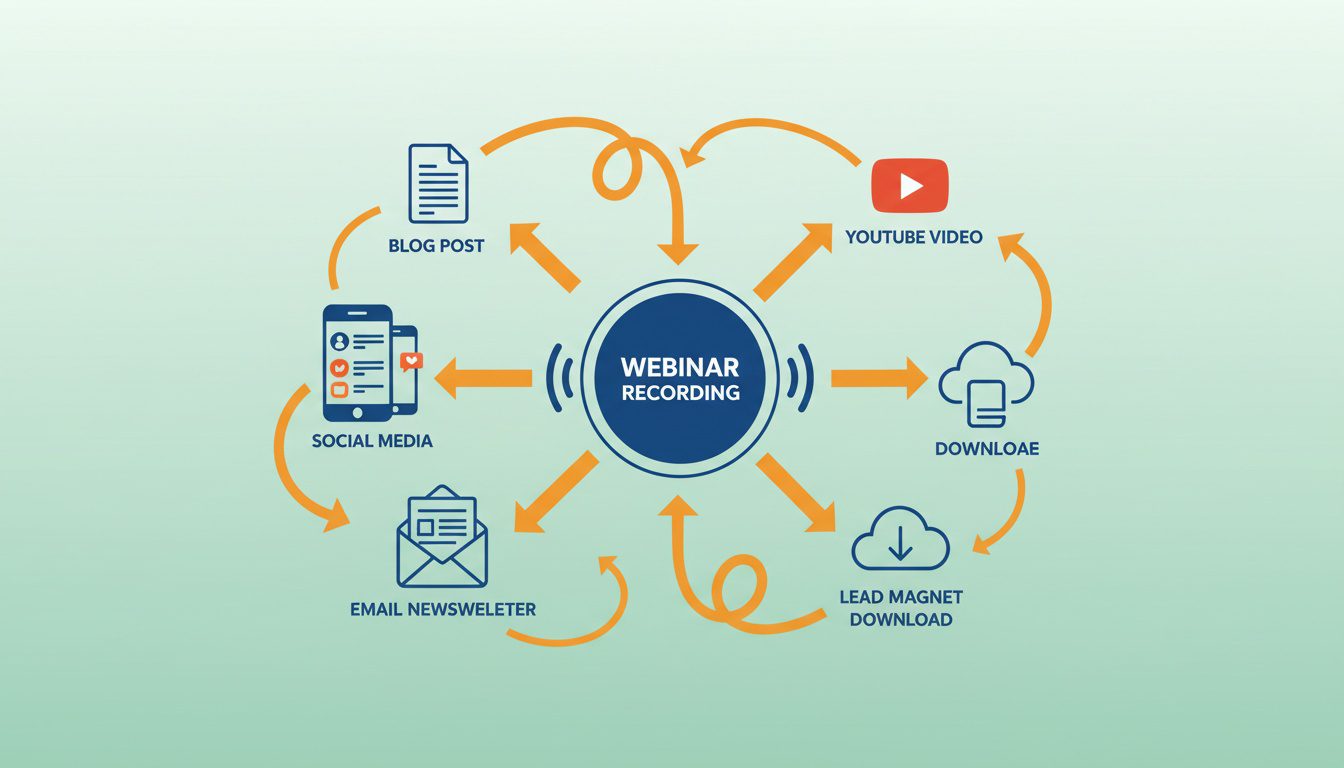
Now... this part matters.
One webinar can become dozens of content pieces. This is where your ROI really compounds.
Going Evergreen
On-demand webinars achieve 86% focus rates compared to 74% for live events. Once you've nailed your live version, automate it:
- Evergreen replay - Run your recording as an "on-demand" event. Same registration page. Same email sequence. Same offer. But automated.
- Hybrid webinars - Pre-recorded content with live Q&A. Cuts your prep time while keeping personal connection.
Automated funnel - Some platforms let registrants pick their preferred time. Webinar runs automatically; you just handle the follow-up.
Multiply Your Content
Squeeze every drop of value from each webinar:
- Blog posts - Transcribe and edit into long-form content (like we cover in our chiropractic content marketing strategy guide).
- Social clips - Cut highlights into 60-second videos for social.
- Email content - Use key points in your regular newsletter.
- Lead magnets - Package the recording as a free resource for new leads. See our guide on chiropractic lead magnets for more ideas.
- YouTube - Upload the full recording or edited highlights. Builds your channel over time.
65% of marketers repurpose webinar content. Don't let all that work live in a single one-time event.
Frequently Asked Questions
How long should a chiropractic webinar be?
The sweet spot is 30-45 minutes, with 44% of attendees preferring 45-minute sessions.
That's enough time to deliver real value, handle questions, and present your offer without losing people. Tack on 10-15 minutes for Q&A to boost engagement and build trust.
Under 30 minutes feels rushed. Over 60 and you risk losing attendees before you even make an offer. 45 minutes works for most chiropractic topics.
What topics work best for chiropractic webinars?
Topics that solve specific problems your ideal patients already know they have.
Winners include: managing back pain without surgery, desk ergonomics for remote workers, sports injury prevention, pregnancy pain relief, and when to see a chiropractor vs. other providers.
Myth-busting topics that tackle misconceptions also crush it. Specificity is key—"Back Pain Relief for Desk Workers Over 40" beats "Understanding Back Pain" every time.
How many people typically attend a chiropractic webinar?
Most webinars get fewer than 50 live attendees, with 40-50% of registrants showing up.
Here's the kicker: for chiropractic practices, smaller audiences actually convert better. Feels more personal. You can address individual questions and build real connections.
A webinar with 25 engaged local attendees can generate more patients than 200 disengaged viewers from who-knows-where.
What's the best day and time to host a chiropractic webinar?
Wednesdays and Thursdays win for attendance, with 2 PM local time being the sweet spot.
Tuesday's best for sending invitations. Avoid Mondays (people are catching up) and Fridays (mentally checked out).
Targeting working professionals? Test evening slots around 7-8 PM when they're actually home and available.
How much does it cost to run a chiropractic webinar funnel?
Basic setup runs $50-200/month for webinar software, plus your time.
Zoom Webinars starts around $79/month. Demio or EasyWebinar run $42-99/month. Add email marketing costs if you don't already have a platform.
The average cost per webinar lead is $72—way cheaper than Google Ads or direct mail.
Should I offer a special deal at the end of my webinar?
Yep. But make it real and time-limited.
Solid offers: discounted initial consults, free posture assessments, waived exam fees, package deals for new patients. Give attendees 48-72 hours to claim it.
This converts 20-40% of engaged attendees into booked appointments. The offer should feel like the natural next step, not a bait-and-switch.
How do I get people to actually show up to my webinar?
Strategic reminder sequence.
Send confirmation immediately after registration. Then reminders at 7 days, 1 day, 1 hour, and 15 minutes before. Each one includes the link, time, and quick value reminder.
Calendar invites in your confirmation email help a ton. And promoting 4 weeks in advance gets you 12% more registrations.
Can I reuse my webinar content after the live event?
100%. And you really should.
On-demand webinars hit 86% focus rates compared to 74% for live. Turn your webinar into: an evergreen automated funnel, blog posts, social clips, email content, YouTube videos.
Lots of chiropractors run the same webinar monthly, refining it each time. That recording becomes a lead magnet working for you 24/7.
Conclusion
Building a chiropractic webinar funnel isn't rocket science. It's just systematic.
Pick a topic that solves real problems. Choose a platform that doesn't make you crazy. Build a registration page that converts. Set up email sequences that drive attendance and follow-up. Deliver genuine value in your presentation. Make an offer that feels like the obvious next step.
Then improve based on what the numbers tell you.
The docs who win with webinars treat them as an ongoing system—not a one-and-done thing. Each webinar teaches you what clicks with your audience. Each recording becomes evergreen content generating leads while you're adjusting patients.
Start with one. Get it dialed in. Then scale from there.
Look, building this whole funnel takes time. And if you're already maxed out running your practice, adding another marketing project to your plate probably sounds exhausting.
That's exactly why we created our Free Website Conversion Analysis. It's not a sales pitch—it's a genuine walkthrough of what's working (and what's broken) on your website, delivered personally via Loom video within 24 hours.
We'll show you exactly:
- Why visitors leave without booking
- What's broken on mobile (where most searches happen)
- Missing trust signals costing you patients
- Where you rank vs. local competitors
- Simple fixes that drive more calls this month
You'll also get an instant case study while you wait, showing real examples of how other chiropractors fixed these exact problems.
Get your free analysis here — no credit card, no obligation, just actionable insights you can use whether you work with us or not.
Because every day your online presence underperforms is another day potential patients are booking with your competitors instead.

Gerek Allen
Co-Owner iTech Valet
Entrepreneur, patriot, CrossFit junkie, IPA enthusiast, loves to travel to tropical destinations, and knows way too many movie quotes.


About iTech Valet
iTech Valet specializes in web design and content marketing for online entrepreneurs who want to share their expertise.
Services Include:
- Web Design
- Graphic Design
- Sales Copy
- Funnel Building
- Authority Sites
- Membership Sites
- Course Creation
- Email Systems
- Content Marketing
- Competitive Analysis
- Tech Integrations
- Strategic Planning
NEED MORE CLIENTS?
Free conversion-focused analysis uncovers the 3 biggest problems killing your bookings — we'll walk you through your results personally

621 Enterprises, Inc. | Copyright 2022 | All rights reserved