

Should I Use a Chatbot on My Chiropractic Website? (ROI + Setup Guide)
 by Gerek Allen ~ Last Updated: Dec 3, 2025 ~ 10 Min Read
by Gerek Allen
~ Last Updated: Dec 3, 2025 ~
~ 10 Min Read ~
Yes—if you're losing patients to after-hours inquiries or your staff spends half the day answering the same questions on repeat.
Healthcare-specific chatbots increase conversion rates by 15-35% and capture 20% more leads. They work while you sleep.
Here's the data: practices using chatbots see 24% more appointment bookings and way better engagement when visitors land on their site at 9 PM on a Tuesday.
The real question isn't whether chatbots work. It's whether your practice will benefit enough to justify the investment.
If you're getting website traffic but low booking rates? If patients call after hours and hit voicemail? If your front desk is drowning in "what are your office hours" calls? You need a chatbot.
Let me show you the actual costs, real conversion data, and step-by-step implementation so you can decide for yourself.
Understanding Chatbot ROI for Chiropractic Practices
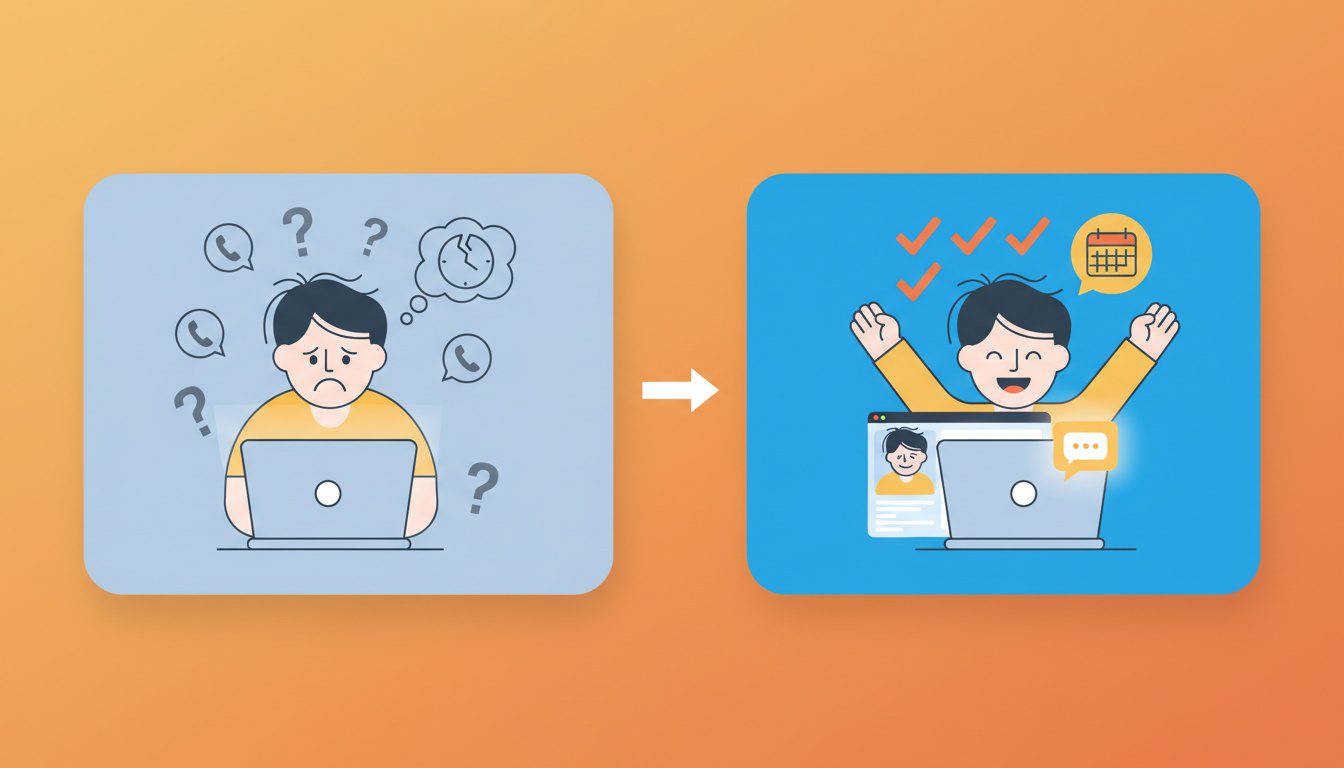
Before you invest a single dollar, you need to understand what "good" actually looks like.
The chatbot market is full of inflated promises and vague success stories. Let's cut through that noise with real numbers from healthcare-specific implementations.
Real Conversion Rate Improvements
According to SmartBot360's customer data, healthcare practices using their chatbot acquire 20% more leads and see 24% more new appointments compared to before implementation.
These aren't pie-in-the-sky projections. They're based on actual patient interactions.
Here's what those numbers mean for your practice:
- Current state: 100 website visitors monthly, 3-5% convert to appointments (3-5 bookings)
- With chatbot: Same 100 visitors, 4-6.5% conversion rate (4-7 bookings)
- Net gain: 1-2 additional patients monthly from same traffic
Sounds modest, right?
But here's the kicker: if the average chiropractic patient is worth $1,500-2,000 over their relationship with your practice, those 1-2 extra monthly bookings represent $18,000-48,000 in additional annual revenue.
Industry data backs this up. Broader conversion research shows conversion rate increases of 15-35% across e-commerce and service businesses when chatbots intervene during critical moments.
For chiropractic websites, that "critical moment" is when someone's deciding whether to book now or keep searching.
Here's how different baseline conversion rates improve with chatbots:
| Below 2% | Poor baseline | 2.5-3% | 3-4% | +1-2 bookings |
| 2-3% | Average baseline | 3-4% | 4-5% | +1-2 bookings |
| 3-5% | Good baseline | 4-6% | 6-7% | +1-3 bookings |
| 5-8% | Strong baseline | 6-9% | 8-11% | +1-3 bookings |
Even practices already converting well see meaningful gains. The worse your current performance, the bigger the improvement potential.
After-Hours Lead Capture Value
Here's where chatbots really shine: capturing patients when your office is closed.
Think about it. Someone hurts their back at 8 PM on a Tuesday. They Google chiropractors, land on your website, and... what happens?
Without a chatbot: They see your phone number, realize you're closed, move to the next search result. Gone forever.
With a chatbot: They get immediate responses, book an appointment, receive confirmation. You captured a lead that would've hired your competitor.
Digital marketing data shows adding a chatbot or SMS booking tool boosts engagement and conversion rates by 30%+ for after-hours visitors.
This isn't about replacing your team. It's about being available when your team physically can't be.
Cost-Benefit Analysis
Let's get specific about whether the math actually works for your practice size.
For Solo Practitioners:
- Monthly chatbot cost: $100-150 (basic healthcare platform)
- Break-even requirement: 1 additional patient booking per month
- Likely outcome: 2-4 additional bookings monthly (conservative estimate)
- Annual ROI: 500-1,200% return
For Small Practices (2-3 Chiropractors):
- Monthly chatbot cost: $200-400 (mid-tier with integrations)
- Break-even requirement: 2-3 additional bookings monthly
- Likely outcome: 5-10 additional bookings monthly
- Annual ROI: 400-800% return
For Multi-Location Practices:
- Monthly chatbot cost: $500-1,500 (enterprise solution)
- Break-even requirement: 8-12 additional bookings monthly across locations
- Likely outcome: 15-30 additional bookings monthly
- Annual ROI: 300-600% return
These numbers assume conservative conversion improvements and don't account for the staff time savings from automated FAQ responses and appointment scheduling.
The Hidden Value: Staff Time Savings
Raw conversion numbers tell only half the story.
Your front desk answers the same damn questions all day:
- "What are your office hours?" (asked 20-50 times weekly)
- "Do you take my insurance?" (15-30 times weekly)
- "What should I bring to my first appointment?" (10-20 times weekly)
- "Where are you located?" (10-15 times weekly)
If your staff spends even 3 minutes per call on these questions, that's 2-4 hours weekly. Roughly $2,000-4,000 annually in labor costs at $25/hour fully loaded.
The chatbot pays for itself on time savings alone. Before you even count the additional patients booked.
Broader AI chatbot research shows 40-60% reduction in customer service costs by handling high volumes of repetitive inquiries without additional headcount.
Your practice operates at smaller scale, but the principle holds: automation of routine questions creates bandwidth for complex patient needs.
Chatbot Types: What Actually Works for Chiropractic
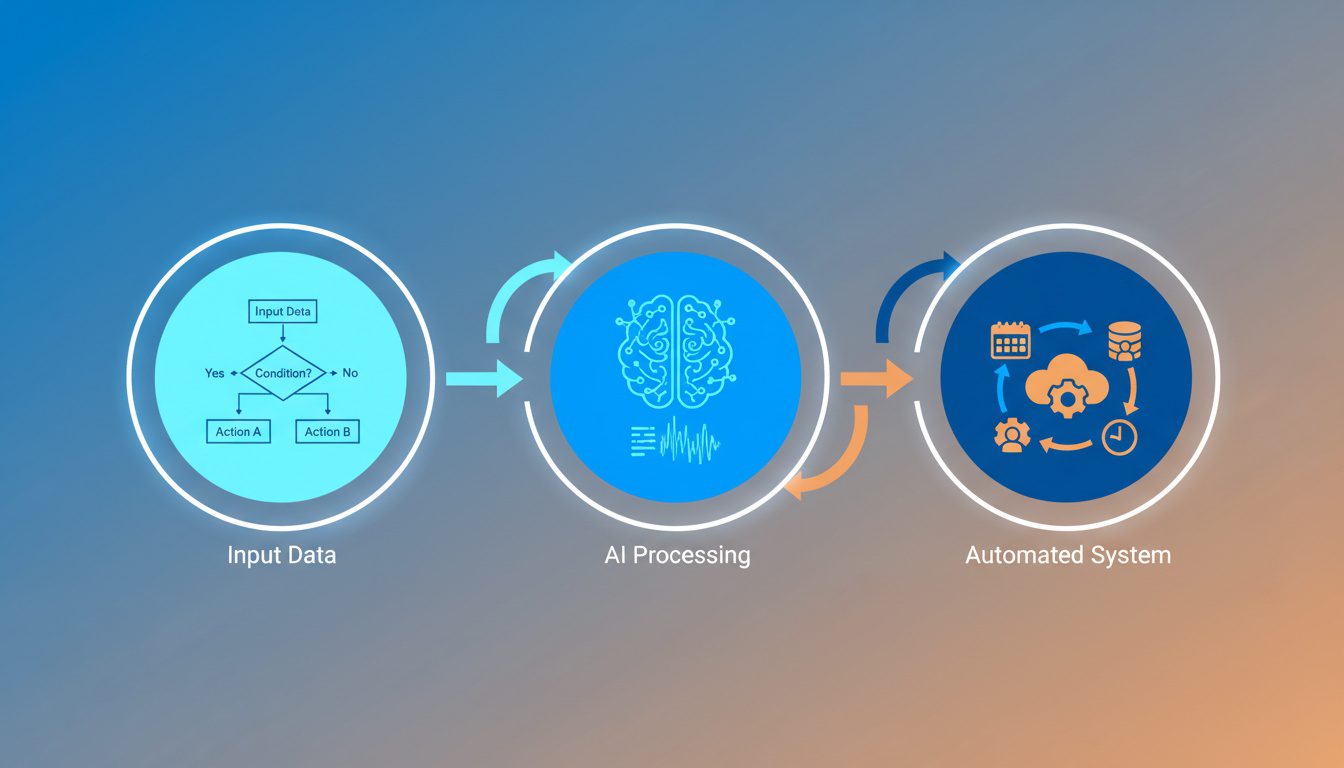
Not all chatbots are created equal. The difference between a basic bot and an AI-powered system can determine whether patients love it or abandon your site in frustration.
Let me break down what actually matters for healthcare practices.
Rule-Based vs. AI-Powered Chatbots
Rule-based chatbots follow decision trees. Patient clicks "Book Appointment" → Bot asks "New or existing patient?" → Patient selects → Bot shows available times.
They're predictable, affordable, and perfect for structured tasks like appointment booking.
AI-powered chatbots use natural language processing to understand varied questions. Patient types "I hurt my lower back yesterday, can you help?" → Bot recognizes injury symptom → Offers relevant service info → Guides to booking.
They're flexible, more expensive, and better at handling unexpected questions.
For most chiropractic practices, here's the decision framework:
- Start with rule-based if your main goal is appointment scheduling and you're on a budget
- Upgrade to AI-powered if you need to handle complex treatment questions or want conversational feel
- Use AI for practices with diverse services (sports chiro, prenatal care, injury rehab) where questions vary widely
According to healthcare chatbot market research, natural language processing technology dominated 40.6% of the healthcare chatbot market in 2025 due to advantages in context awareness and multilingual capabilities.
But that doesn't mean it's right for every practice. Match the technology to your specific needs.
HIPAA Compliance Requirements
This is non-negotiable.
Generic business chatbots are NOT appropriate for healthcare practices. Period.
Your chatbot must be HIPAA compliant if it collects, stores, or transmits any protected health information (PHI). This includes:
- Patient names and contact information paired with health concerns
- Appointment details connected to specific treatments
- Insurance information
- Any symptom descriptions or medical history
Healthcare chatbot security research shows HIPAA compliance implementation requires strong data encryption, user authentication, and integration into compliant systems. It's complex and costly.
Here's what HIPAA-compliant chatbots must include:
- End-to-end encryption for all data transmission
- Secure data storage with access controls
- Audit logs tracking all patient interactions
- Business Associate Agreement (BAA) from the vendor
- Ability to delete patient data upon request
Platforms specifically designed for healthcare like SmartBot360, Emitrr, and Kore.ai HealthAssist explicitly prioritize HIPAA compliance. Generic tools like standard Intercom or Drift setups typically don't meet these requirements.
Don't risk it.
The penalties for HIPAA violations range from $100-50,000 per violation, with maximum annual penalties of $1.5 million per violation category.
Essential Features for Healthcare Chatbots
Based on what actually drives results, your chatbot needs these core capabilities:
Appointment Scheduling Integration
The chatbot must connect directly to your scheduling software—whether that's Acuity, Jane App, SimplePractice, or another system. Real-time availability prevents double-bookings and reduces manual data entry.
SMS Follow-Up Capability
Chatbot captures the lead, then follows up via text with appointment reminders and confirmations. This combination increases show-up rates and keeps patients engaged between visits.
Multi-Channel Deployment
Your chatbot should work on:
- Your website (most important)
- Facebook Messenger (where patients often search for local businesses)
- SMS/text messaging (for ongoing communication)
Natural Language Understanding
Even if you start with a rule-based system, look for platforms that learn from patient conversations over time. SmartBot360's research shows they've analyzed 100,000+ patient chats to model patient needs and minimize drop-outs across healthcare specialties.
This learning capability means your chatbot gets better at understanding how your specific patients ask questions.
Handoff to Human Staff
When patients ask complex questions beyond the chatbot's scope, seamless handoff to your team is critical. Look for systems with chat notifications that alert staff when human intervention is needed.
Analytics and Reporting
You need visibility into:
- Conversation volume and timing (when are patients engaging?)
- Common questions (what should you add to the bot or your website?)
- Drop-off points (where do patients abandon the conversation?)
- Conversion rates (booking completion percentage)
Without this data, you're flying blind on optimization.
NEED MORE CLIENTS?
Free conversion-focused analysis uncovers the 3 biggest problems killing your bookings — we'll walk you through your results personally
Real Costs: What You'll Actually Pay
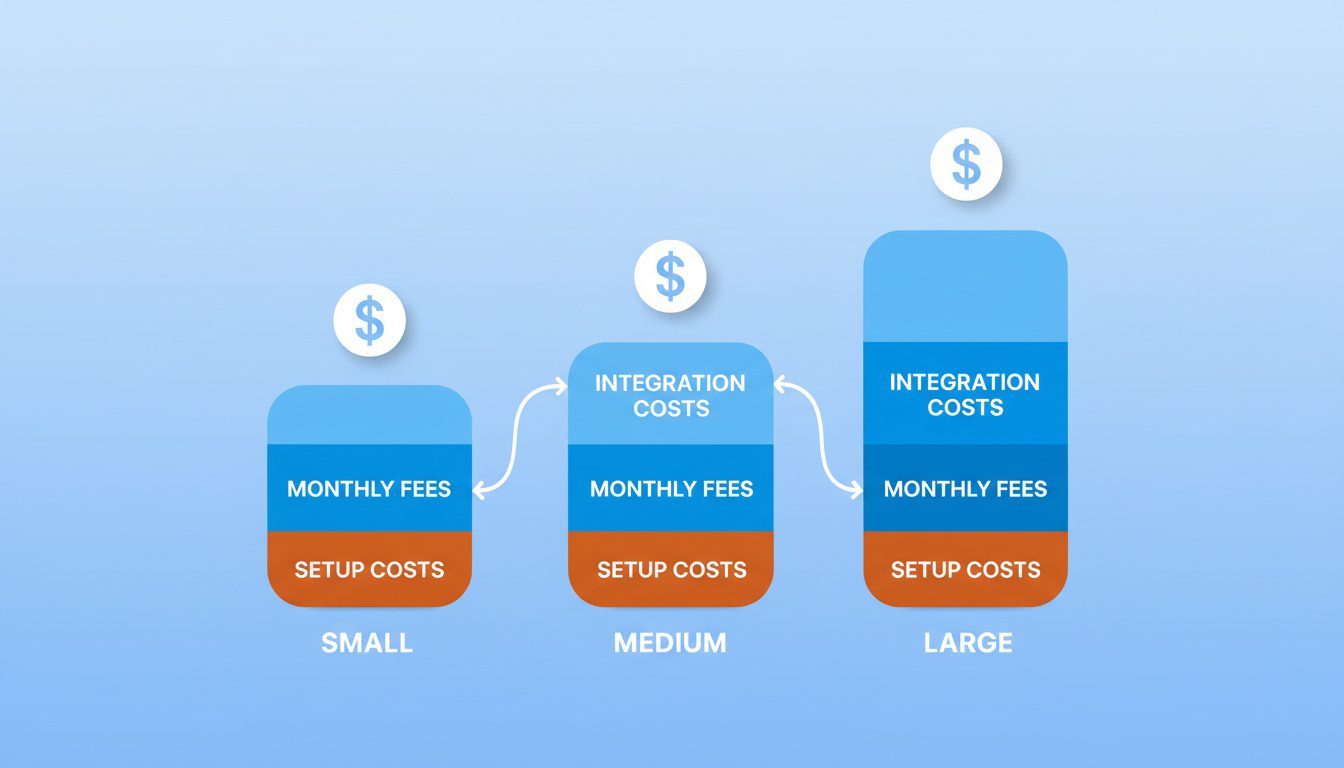
Let's talk real numbers. Not "it depends" vagueness—actual pricing you can budget for.
I've researched current market rates across healthcare-specific platforms so you know exactly what you're getting into.
Platform Pricing Comparison
Here's what you'll actually pay for HIPAA-compliant chatbot platforms suitable for chiropractic practices:
| BotPenguin | $15-50 | Free templates | Budget-conscious solo practices | Basic features, limited AI |
| SmartBot360 | $99-199 | Custom setup available | Small practices needing healthcare-specific templates | Pricing not fully transparent |
| Emitrr | $99+ | Quick onboarding | Service-based businesses wanting SMS integration | Newer to healthcare market |
| Kore.ai | $50-200+ | Professional setup recommended | Practices wanting enterprise features | Steeper learning curve |
| Custom Development | $15,000-75,000 | $50,000-200,000 total | Multi-location practices with unique workflows | High upfront investment |
Most small practices (1-3 chiropractors) should target the $100-200 monthly range. This gets you HIPAA compliance, scheduling integration, and healthcare-specific templates without breaking the bank.
According to 2025 healthcare chatbot development cost research, basic symptom checker and appointment scheduler implementations run $50,000-75,000 for custom builds, while sophisticated chatbots accessing patient records reach $150,000-200,000.
Unless you're running a large multi-location operation with very specific needs, go with an established platform. Custom development rarely makes financial sense for practices under 10 chiropractors.
Hidden Costs to Consider
The monthly subscription fee isn't the full story. Budget for these additional expenses:
Integration Costs
Connecting your chatbot to existing systems typically adds 20-50% to your budget. API integrations with scheduling software, CRM, and payment processors range from $5,000-25,000 for custom implementations or $0-500 for pre-built connections.
Most healthcare chatbot platforms offer pre-built integrations with popular tools, but verify this before purchasing.
Training and Setup Time
Even "easy" platforms require:
- Initial setup: 4-8 hours defining conversation flows and responses
- Staff training: 2-4 hours teaching handoff procedures
- Ongoing optimization: 2-3 hours monthly reviewing analytics and updating flows
If you're doing this yourself, it's "free" but takes your time. If you hire help, expect $75-150 per hour for consulting.
Maintenance and Updates
Annual maintenance runs $1,000-5,000 for basic platforms, with security updates costing $500-2,500 monthly for enterprise solutions.
Healthcare chatbots require continuous updates to maintain medical accuracy and meet evolving HIPAA regulations. Budget $100-300 monthly beyond your base subscription for this upkeep.
Content Development
Your chatbot is only as good as the information you feed it. You'll need:
- FAQ database (what questions do patients actually ask?)
- Service descriptions (clear explanations of what you treat)
- Policy information (insurance, payment, scheduling policies)
- Response templates (how should the bot communicate your brand voice?)
This takes 10-20 hours initially, plus ongoing refinement. Either allocate staff time or hire a healthcare content specialist at $50-100 per hour.
Cost vs. Value Decision Framework
Here's how to determine if the investment makes sense for your specific practice:
Calculate Your Current Cost Per Patient Acquisition
Add up your monthly marketing spend (website, SEO, ads, directories) and divide by new patients acquired. If you're spending $2,000 monthly and getting 20 new patients, your cost per acquisition is $100.
Estimate Chatbot Impact
Conservative estimate: 10-20% conversion rate improvement equals 2-4 additional patients monthly from same traffic.
At $100 cost per acquisition through other channels, a chatbot generating 2-4 patients monthly is delivering $200-400 in value.
Compare to Chatbot Total Cost
Platform fee ($100-150) + integration amortized ($50-100) + time investment ($50-100) = $200-350 monthly all-in.
If the chatbot generates $200-400 in equivalent marketing value while also saving staff time, it's a clear win.
Break-Even Timeline
Most practices hit break-even within 2-4 months as conversation flows are optimized and conversion rates improve. According to AI chatbot ROI research, clients typically see average ROI within 3-6 months.
The key is treating the first 90 days as a test period. Track leads captured, bookings completed, and staff time saved. If the numbers don't justify continuation, platforms offer monthly plans you can cancel.
Ready to See How We Fix Chiropractic Websites?
We've transformed 150+ service-based websites using our proven 4-step system. See exactly how we combine premium design with conversion science.
Step-by-Step Implementation Guide
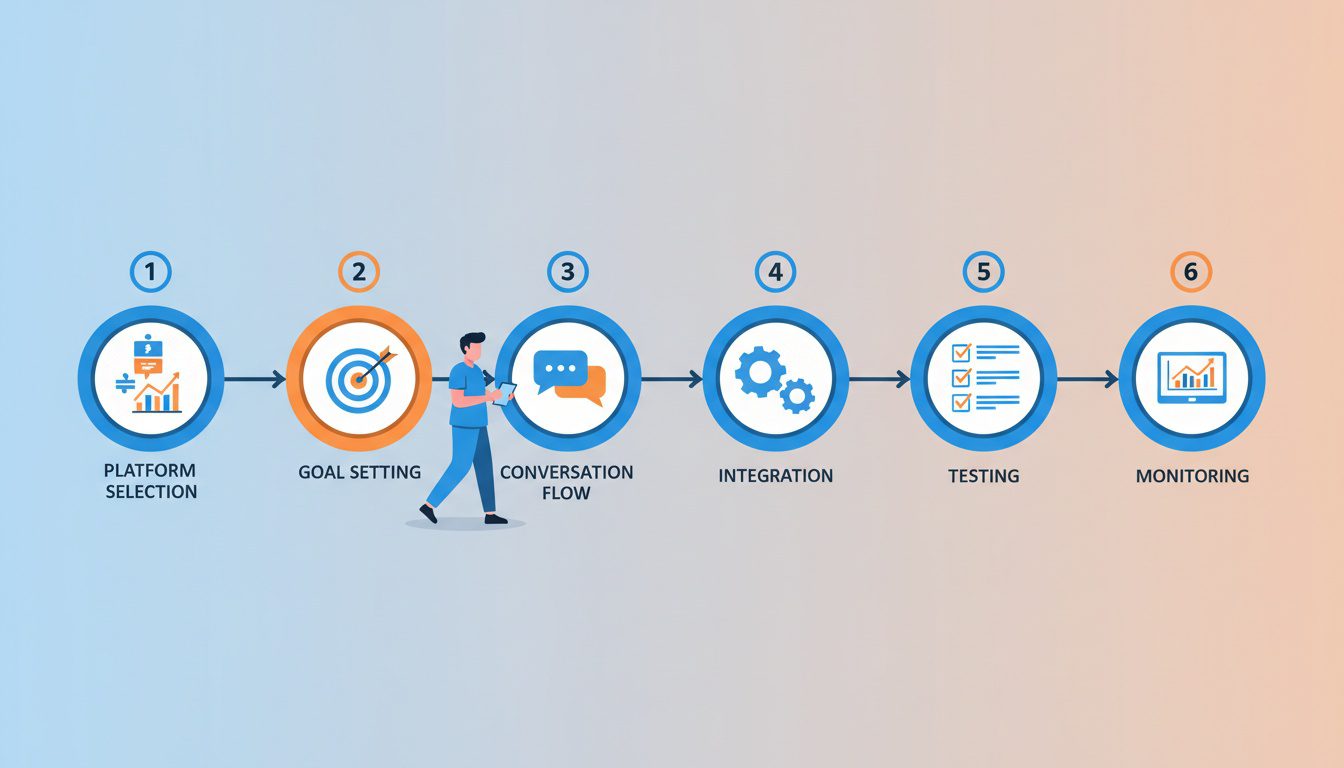
Alright, you've decided a chatbot makes sense for your practice. Now comes the actual work of getting it running.
This isn't complicated, but it does require following a methodical process. Skip steps and you'll end up with a frustrating patient experience.
Step 1: Choose Your Platform
Start by evaluating 3-5 healthcare-specific chatbot platforms against your requirements.
Your decision criteria should include:
- HIPAA compliance status - Non-negotiable, must be explicitly stated with BAA available
- Integration capabilities - Does it connect to your scheduling software and CRM?
- Pricing transparency - Avoid platforms that hide pricing behind sales calls
- Healthcare templates - Pre-built conversation flows save 10-20 hours of setup time
- Customer support quality - Read reviews specifically about support responsiveness
For solo practitioners on a budget: Start with BotPenguin ($15-50 monthly) or Emitrr ($99+).
For small practices wanting healthcare-specific features: SmartBot360 ($99-199 monthly) offers templates optimized for patient conversations.
For practices wanting enterprise capabilities: Kore.ai HealthAssist (starting $50 monthly) provides advanced NLP and analytics.
Book demos with your top 2-3 choices. Test the actual interface, ask specific questions about HIPAA compliance documentation, and confirm integration capabilities with your existing tech stack.
Step 2: Define Your Chatbot Goals
Before building anything, map out exactly what you want the chatbot to accomplish.
Most chiropractic practices should prioritize these goals in order:
Primary Goal: Appointment Booking
This delivers immediate ROI. Your chatbot should guide patients through:
- New vs. existing patient identification
- Service type selection (injury, maintenance, specific condition)
- Date and time preference
- Contact information collection
- Appointment confirmation
Secondary Goal: Common Question Responses
Automate answers to questions your staff fields repeatedly:
- Office hours and location
- Insurance acceptance and payment policies
- What to bring to first appointment
- Parking and building access instructions
- Services offered and conditions treated
Tertiary Goal: Lead Qualification
For practices with lead generation programs, use the chatbot to qualify prospects before human follow-up:
- Identify patient's primary concern
- Assess urgency level
- Capture contact preferences
- Route hot leads to immediate staff attention
Define success metrics for each goal. Appointment booking success rate above 40%, FAQ containment rate above 60%, lead qualification completion rate above 70% are good targets.
Step 3: Build Your Conversation Flows
Now comes the actual chatbot building. Most platforms use visual flow builders or templates you customize.
Start with these core conversation flows:
Flow 1: Appointment Scheduling
Bot: "Hi! Are you looking to book an appointment today?"
Patient: [Yes/No buttons]
If Yes → "Great! Are you a new patient or returning?"
If New → Collect: Name, Phone, Email, Preferred service, Date preference
If Returning → Collect: Name, Phone, Date preference
Show available times → Confirm booking → Send confirmation text
Flow 2: Insurance Questions
Bot: "I can help with insurance questions. What would you like to know?"
Patient: Options → "Do you take my insurance?" / "What's the cost without insurance?" / "What do I need to bring?"
Bot: Provides specific answer based on selection
Ends with: "Would you like to book an appointment?" [Yes/No]
Flow 3: Office Information
Bot: "Looking for our office details?"
Options → "Address & directions" / "Office hours" / "Parking information"
Bot: Provides specific information
Ends with: "Anything else I can help you with?" [Return to main menu/End chat]
Use your actual patient language. Don't write how you think patients should talk—write how they actually do. Review your front desk call logs or email inquiries for phrasing patterns.
SmartBot360's platform uses four data sources (keyword detection, FAQ sheets, previous chat logs, and website content) to create more comprehensive AI that handles varied patient phrasing.
Test every flow yourself. Click through as if you're a confused patient. If you get stuck, patients definitely will.
Step 4: Integrate with Your Systems
Your chatbot needs to connect with your existing tools to actually be useful.
Critical Integrations:
Scheduling Software - This is make-or-break. Direct API integration ensures real-time availability. If direct integration isn't available, use Zapier as a bridge (adds $20-50 monthly but saves manual data entry).
CRM or Patient Management System - Captured leads flow automatically into your existing patient database for follow-up.
Email/SMS Marketing Platform - New leads receive automated nurture sequences. Booked patients get appointment reminders.
Google Analytics - Track chatbot usage, conversion events, and drop-off points.
Most healthcare-specific chatbot platforms offer pre-built integrations with popular tools. According to healthcare chatbot market analysis, cloud-based deployment dominates the market due to lower costs and scalability, making integrations easier.
If you're using less common software, verify integration capabilities before committing to a platform. Custom API work costs $5,000-25,000 and takes 4-8 weeks—probably not worth it for small practices.
Step 5: Test and Launch
Before going live to patients, run comprehensive testing:
Functionality Testing
- Test every conversation path (click all buttons, try all flows)
- Verify appointment bookings actually create calendar entries
- Confirm lead data flows to your CRM correctly
- Check all links and resource downloads work
Responsiveness Testing
- Test on mobile devices (where 60-70% of searches happen)
- Check load times (should be under 3 seconds)
- Verify chat widget doesn't block critical website content
- Test on different browsers (Chrome, Safari, Firefox)
User Experience Testing
- Ask staff members unfamiliar with the setup to test as patients
- Can they successfully book an appointment without help?
- Are responses clear and helpful?
- Is the handoff to human staff obvious when needed?
Soft Launch Strategy
Don't announce the chatbot broadly right away. Enable it on your website and monitor for 1-2 weeks:
- Watch first 50-100 conversations closely
- Identify confusing questions or dead ends
- Update flows based on real patient behavior
- Train staff on handoff procedures for questions the bot can't handle
Once you're confident it's working smoothly, promote it through your email marketing and social channels.
Step 6: Monitor and Optimize
The first version of your chatbot won't be perfect. Nobody's is.
Plan on monthly optimization for the first 6 months.
Key Metrics to Track:
- Conversation starts (how many patients engage?)
- Completion rate (how many finish the interaction?)
- Appointment booking rate (conversions from conversations)
- Top questions asked (what should you add to the bot?)
- Drop-off points (where do patients abandon?)
- After-hours engagement (are you capturing those leads?)
Monthly Optimization Routine:
- Review chat logs for the past 30 days (spend 60-90 minutes on this)
- Identify 3-5 common questions the bot struggles with
- Update responses or add new conversation paths
- Check integration performance (are appointments syncing correctly?)
- Review staff handoff quality (are complex questions being answered?)
Here's a realistic timeline for what to expect:
| Week 1-2 | Setup and testing | 0-20% of potential | Building flows, testing all paths |
| Week 3-4 | Soft launch monitoring | 20-40% of potential | Watching first real conversations, fixing obvious issues |
| Month 2 | Active optimization | 40-70% of potential | Updating flows based on patient feedback, training staff |
| Month 3 | Performance stabilizing | 70-85% of potential | Fine-tuning responses, expanding capabilities |
| Month 4-6 | Steady state | 85-100% of potential | Maintenance mode, quarterly reviews |
According to conversion rate optimization best practices, continuous testing and refinement is how you maximize performance.
Treat your chatbot like your website—it's never truly "done." It evolves as you learn what patients need.
Common Mistakes to Avoid
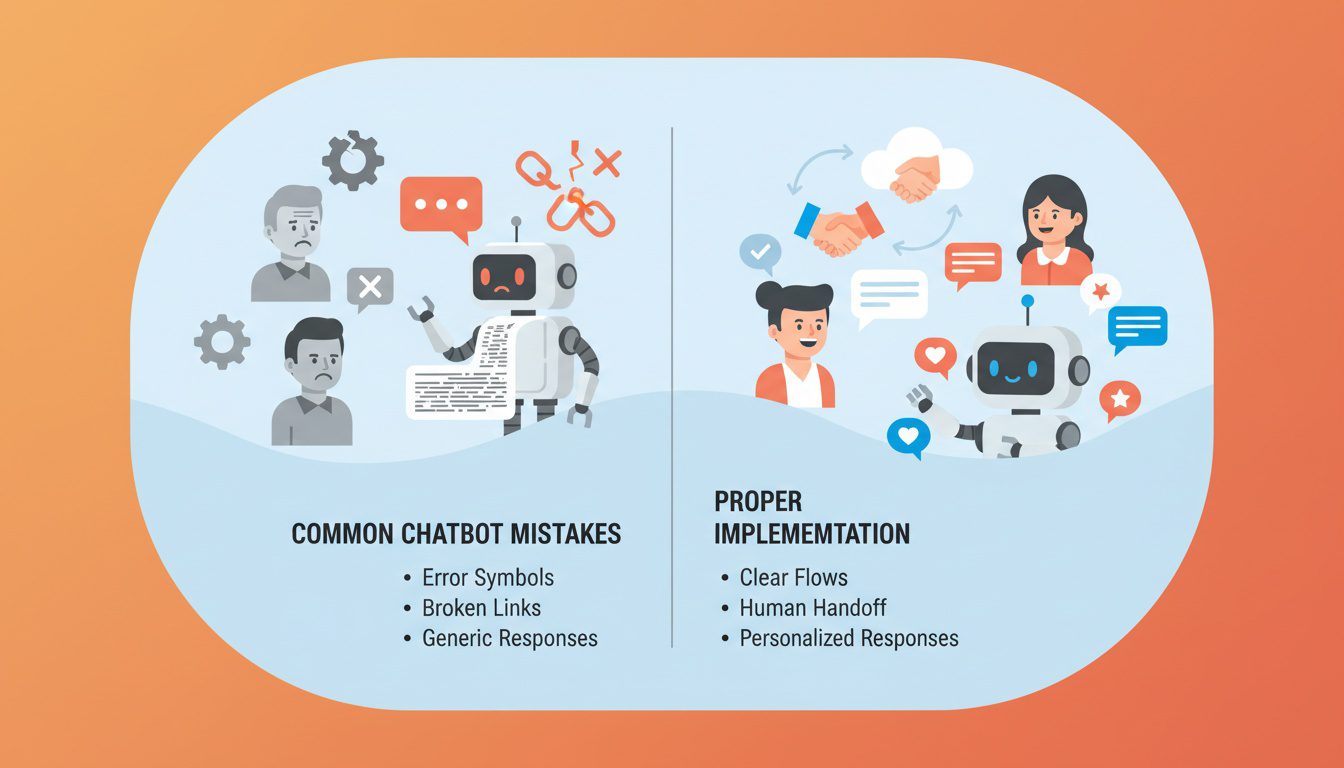
I've seen enough practices implement chatbots to know where things typically go wrong.
Learn from others' mistakes instead of making them yourself.
Over-Promising Bot Capabilities
The biggest mistake is positioning your chatbot as able to handle everything when it can't.
Patients quickly get frustrated when they ask a legitimate question and the bot responds with "I don't understand" or worse, provides an incorrect answer.
Be upfront about what the bot can do:
- ✅ Good: "I can help you book appointments, answer insurance questions, and provide office information. For specific treatment questions, I'll connect you with our team."
- ❌ Bad: "I can answer any questions you have!" (sets unrealistic expectations)
According to healthcare chatbot effectiveness research, 76% of physicians worry that chatbots can't meet all patient needs, with 72% pointing to lack of emotional understanding and 74% concerned about inaccurate responses.
Don't contribute to these valid concerns. Position your chatbot as what it is: a helpful tool for specific tasks, not a replacement for human expertise.
Neglecting Mobile Experience
Your chatbot might work perfectly on desktop but be a disaster on mobile.
This matters because most local searches happen on smartphones. If your chat widget covers the entire mobile screen or buttons are too small to tap accurately, patients will close it immediately.
Test on actual phones, not just desktop browser resizing. Check:
- Is the chat widget easy to minimize if blocking content?
- Are buttons large enough for thumb navigation?
- Does text size adjust appropriately for small screens?
- Can patients easily scroll through conversations?
According to mobile-friendly website research, mobile optimization is critical for conversion rates as the majority of healthcare searches happen on mobile devices.
Your chatbot is part of that mobile experience. Make sure it enhances rather than degrades the user experience.
Forgetting About Analytics
Installing a chatbot without tracking its performance is like running Facebook ads without checking results.
You're spending money but have no idea if it's working.
Set up tracking for:
- Chatbot conversation starts (Google Analytics event)
- Appointment booking completions (conversion tracking)
- Lead form submissions (CRM integration)
- Drop-off points (platform analytics)
Most healthcare chatbot platforms include built-in analytics, but you should also connect them to your broader marketing analytics system for complete visibility into ROI.
Review metrics monthly at minimum. Quarterly deep dives into conversation patterns help identify optimization opportunities.
Using Generic Business Chatbots
This bears repeating: generic business chatbots are not appropriate for healthcare practices.
Tools designed for e-commerce or SaaS companies lack:
- HIPAA compliance capabilities
- Healthcare-specific conversation templates
- Proper data encryption and storage
- Business Associate Agreements
- Understanding of patient privacy requirements
Even if a generic platform is cheaper, the compliance risk isn't worth it. Stick with healthcare-specific solutions that explicitly state HIPAA compliance.
Chatbots handling sensitive patient data must comply with strict regulatory laws including HIPAA, requiring end-to-end encryption, secure data storage, and audit logs.
Don't cut corners on this. The penalties for HIPAA violations are severe, and patient trust is hard to rebuild once lost.
Ignoring Staff Training
Your front desk team needs to understand how the chatbot works and when it hands off to humans.
Without proper training:
- Staff won't know when the bot has captured a lead requiring follow-up
- Handoff from bot to human feels disjointed and unprofessional
- Team can't help patients who mention the chatbot in phone calls
- Nobody knows how to update the bot when information changes
Schedule 1-2 hours of hands-on training covering:
- How the chatbot works from the patient perspective
- What questions trigger human handoff
- Where to find captured leads in your CRM
- How to review chat logs for quality issues
- Who owns chatbot optimization responsibilities
Treat the chatbot as a new team member. Everyone needs to understand its role and how to work alongside it effectively.
Frequently Asked Questions About Chiropractic Chatbots
How much does a chatbot cost for a small chiropractic practice?
For small chiropractic practices, basic chatbot solutions typically range from $50-150 per month for platforms like SmartBot360, Emitrr, or BotPenguin. These include appointment scheduling, FAQ responses, and basic automation.
Mid-tier options with advanced features run $150-500 monthly. Custom development starts around $15,000-75,000 for setup plus monthly maintenance of $100-300.
The sweet spot for most 1-3 chiropractor practices is $100-200 monthly for an established healthcare platform with HIPAA compliance and scheduling integration. This typically delivers ROI within 3-6 months through increased bookings and staff time savings.
What conversion rate improvement can I expect from adding a chatbot?
Healthcare chatbot data shows practices typically see 15-35% increases in conversion rates after implementation. Specific metrics from SmartBot360 customers show 20% more leads captured and 24% increase in new appointment bookings compared to before chatbot use.
Your actual results depend on several factors: current website performance, chatbot quality, traffic volume, and how well you optimize conversation flows. Practices starting with low conversion rates (under 2%) often see dramatic improvements, while those already converting well (5%+) see smaller percentage gains.
The biggest impact comes from after-hours lead capture. Research shows 30%+ conversion rate boosts when chatbots are combined with SMS booking tools for visitors landing on your site outside business hours.
Set conservative expectations initially. Even a 10% improvement in conversion rate is significant when multiplied by lifetime patient value.
Are chatbots HIPAA compliant for chiropractic practices?
Not all chatbots are HIPAA compliant. You need platforms specifically designed for healthcare that explicitly state HIPAA compliance capabilities.
Look for these requirements:
- End-to-end encryption for all data transmission
- Secure data storage with access controls and audit logs
- Business Associate Agreement (BAA) provided by vendor
- Ability to delete patient data upon request
- Regular security audits and updates
Platforms like SmartBot360, Emitrr, and Kore.ai HealthAssist are built for healthcare and prioritize HIPAA compliance. Generic business chatbots like standard Intercom or Drift configurations typically do NOT meet HIPAA requirements.
Never use a generic business chatbot for collecting patient health information. The compliance risks and potential penalties ($100-50,000 per violation) far outweigh any cost savings.
Verify HIPAA compliance documentation before purchasing, and ensure your contract includes a signed BAA.
How long does it take to see ROI from a chatbot?
Most chiropractic practices see measurable ROI within 3-6 months. This timeline is consistent across service businesses.
However, smaller practices often see break-even much faster. Here's realistic timing:
- Month 1: Setup and testing (minimal ROI, learning period)
- Month 2-3: Optimization as conversation flows improve (1-2 additional patients monthly)
- Month 4-6: Full performance (3-5 additional patients monthly at steady state)
If you're spending $100-150 monthly and the chatbot converts just 2-3 additional patients per month at $1,500-2,000 lifetime value, you're profitable from day one—you just don't always see it immediately in the first 30 days.
The key metrics to watch: lead capture rate increasing, booking completion rate improving, and after-hours conversions growing. These indicators show momentum before the full financial impact appears.
Be patient through the first 90 days while optimizing. Most practices that fail with chatbots give up too early, before optimization kicks in.
What's the difference between a basic chatbot and an AI-powered chatbot?
Basic chatbots follow rule-based scripts with predefined responses and button-driven flows. They're like automated phone menus: "Press 1 for appointments, press 2 for insurance questions."
AI-powered chatbots use natural language processing (NLP) to understand varied patient questions and provide contextual answers. They can handle "I hurt my back yesterday" or "what do you charge for adjustments?" without requiring exact keyword matches.
For chiropractic practices, here's when each makes sense:
Use rule-based (basic) chatbots when:
- Your primary goal is appointment scheduling
- Budget is tight ($50-150 monthly)
- Questions are predictable and structured
- You're a solo practitioner or small practice
Use AI-powered chatbots when:
- You need to handle complex treatment questions
- Your practice offers diverse services (sports injury, prenatal, pediatric care)
- You want conversational feel rather than rigid menus
- Budget allows $200-500+ monthly
NLP-based chatbots dominated 40.6% of the healthcare market in 2025 due to better context awareness and patient engagement.
But don't assume AI is always better. Many practices get great results with simple rule-based bots for appointment booking. Match the technology to your specific needs and budget.
Will a chatbot replace my front desk staff?
No. Chatbots complement your team, they don't replace them.
Think of a chatbot as a tireless assistant that handles repetitive, predictable tasks so your staff can focus on complex patient needs requiring human judgment and empathy.
What chatbots DO handle well:
- Appointment scheduling during business hours and after-hours
- Common questions about office hours, location, insurance acceptance
- Basic new patient information and what to bring
- Pre-screening for specific services or conditions
What chatbots DON'T handle well:
- Complex insurance verification requiring back-and-forth discussion
- Emotional patients needing reassurance about treatment concerns
- Nuanced treatment recommendations based on patient history
- Resolving billing issues or payment problems
Chatbots excel at automating repetitive tasks and freeing healthcare staff to focus on complex clinical care, but 72% of physicians note lack of emotional understanding as a limitation.
Your chatbot captures leads when the office is closed, reduces phone volume during busy hours, and handles simple questions 24/7. Your staff provides the human connection, clinical judgment, and problem-solving that patients truly need.
They work together to deliver better patient experience and practice efficiency.
Can chatbots integrate with my existing scheduling software?
Most healthcare chatbot platforms integrate with popular scheduling systems through APIs or tools like Zapier.
Common integrations include:
- Acuity Scheduling - Direct integration available
- Jane App - API integration supported
- SimplePractice - Integration through Zapier or API
- ChiroTouch - Limited integrations, check compatibility
- Kareo - API integration available
Before purchasing a chatbot platform, verify:
- Does it integrate directly with your specific scheduling software?
- Is the integration real-time (showing actual availability)?
- Are there additional costs for API access?
- How are booking confirmations handled?
- What happens if the integration breaks?
Direct integrations work better than workarounds. Real-time appointment availability prevents double-bookings and creates better patient experience. If the chatbot can check availability and book immediately, patients complete the process. If they have to wait for staff to confirm, you lose conversions.
Most healthcare-specific platforms like SmartBot360 and Emitrr have built common integrations. Generic platforms may require custom API work ($5,000-25,000 cost, 4-8 weeks timeline).
Check integration capabilities during your demo calls. Ask to see the integration working live, not just promises that "it can be done."
Making Your Decision
Look, I've given you the data, the real costs, and the step-by-step implementation process.
Now it comes down to your specific situation.
A chatbot makes sense if you're consistently getting website traffic but low booking rates. If your phone rings constantly with the same questions. If patients call after hours and get voicemail while your competitors capture those leads.
It doesn't make sense if you're barely getting website visitors yet. Fix your local SEO and marketing strategy first. A chatbot can't help if nobody's visiting your site.
The ROI is clear for practices with decent traffic: 15-35% conversion rate improvements, 20% more leads, 24% more bookings, plus staff time savings on repetitive questions. At $100-200 monthly investment, you're looking at break-even within 2-4 months.
Start small. Pick a healthcare-specific platform in the $100-150 monthly range, focus on appointment booking and FAQ automation, and optimize for 90 days before deciding if it's working.
The practices that succeed with chatbots treat them as ongoing marketing tools requiring optimization, not set-it-and-forget-it solutions.
Look, I get it—this is a lot to implement on top of actually running your practice and treating patients.
If you're thinking "this all makes sense, but I don't have time to do it right," you're not alone. Most successful chiropractors we work with felt the same way before they realized their website and online presence were quietly costing them 15-20 qualified patient leads every single month.
That's why we created our Free Website Conversion Analysis. It's not a sales pitch—it's a genuine walkthrough of the 3 biggest problems killing your bookings, delivered personally via Loom video within 24 hours.
We'll show you exactly:
- Why visitors leave without booking
- What's broken on mobile devices (where most searches happen)
- Missing trust signals costing you patients
- Where you rank vs. local competitors
- Simple fixes that drive more calls this month
You'll also get an instant case study while you wait, showing real examples of how other chiropractors fixed these exact problems.
Get your free analysis here — no credit card, no obligation, just actionable insights you can use whether you work with us or not.
Because every day your website sits unoptimized is another day patients are choosing your competitors instead.

Gerek Allen
Co-Owner iTech Valet
Entrepreneur, patriot, CrossFit junkie, IPA enthusiast, loves to travel to tropical destinations, and knows way too many movie quotes.


About iTech Valet
iTech Valet specializes in web design and content marketing for online entrepreneurs who want to share their expertise.
Services Include:
- Web Design
- Graphic Design
- Sales Copy
- Funnel Building
- Authority Sites
- Membership Sites
- Course Creation
- Email Systems
- Content Marketing
- Competitive Analysis
- Tech Integrations
- Strategic Planning
NEED MORE CLIENTS?
Free conversion-focused analysis uncovers the 3 biggest problems killing your bookings — we'll walk you through your results personally

621 Enterprises, Inc. | Copyright 2022 | All rights reserved